HP OmniBook 7 (2026 | Panther Lake)
- Features, Ergonomics & Design
- General Computing & CPU Performance
- Graphics & Gaming Performance
- Portability & Battery Life
- Value For Money
Summary
The 2026 HP OmniBook 7 is the first laptop we’ve seen with the latest Intel Core Ultra (Series 3) Panther Lake processor. This makes it fast, boosts battery life and elevates its gaming potential. It’s also got great ergonomics and features.
Pros
Powerful for the price
Game friendly
Long battery life
Cons
Heavy
Not cheap
It took a while, but we’ve finally got our first Intel Core Ultra (Series 3) laptop – codename Panther Lake – in for review. It’s a mid-range, 16-inch HP model that uses one of the new high-end processors which promises better all-round performance, better battery life and some significant gaming performance. Let’s see how it fares…
Table of Contents
- HP OmniBook 7 Specs
- Features, Ergonomics and Design
- Performance
- Portability & Battery Life
- Price, Value & Availability
- Conclusion: Should You Buy The Panther Lake HP OmniBook 7?
- Awards
HP OmniBook 7 Specs
| Screen | 16-inch, matte, 240Hz, 2,560 x 1,600, IPS display |
| Processor | 1.5-4.8GHz Intel Core Ultra X7 358H CPU |
| Memory | 32GB DDR5-8533 RAM |
| Graphics | 2.5GHz 12-core Intel Arc Graphics |
| Hard drive | 1TB |
| Connectivity | Wi-Fi 7 Bluetooth 6 2 x Thunderbolt 4 1 x USB-A 3.2 Gen 1 1 x USB-A 3.2 Gen 2 1 x HDMI 2.1 1 x 3.5mm audio jack |
| Speakers | Stereo (unspecified) |
| Extra Security | Windows Hello (webcam) |
| Webcam | 1,440p |
| Battery | 70Wh |
| Dimensions | 358 x 255 x 15mm |
| Weight | 1.96KG |
| SKU | 16-bh0001TU |
Features, Ergonomics and Design
At a glance, the 2026 Panther Lake HP OmniBook 7 looks like a mid-tier model that’s less bulky than its full-blown gaming siblings but substantially larger than it’s svelte, thin-and-light relatives. Yet, look closer and you realise that the ‘Meteor Silver’ sandblasted, anodised-aluminium chassis oozes quality, is stylish, corporate friendly, impressively fingerprint repellent and doesn’t look bad in any environment.
Opening it up reveals the 16-inch, 2,560 x 1,600 display. It’s bright and colourful but can’t match an OLED screen for chromatic vibrancy and contrast. It’s also not HDR compatible and details can get lost in highlights, but they do remain visible in dark and shadowy areas to an impressive degree. There’s very light stepping in colour gradients and only very light grain in monochromatic counterparts – it’s much better than many non-HDR rivals. However, there is a big benefit of not having an OLED and that’s the matte coating which doesn’t turn into a black mirror when viewing dark content or using it in bright environments.

The display also has a very fast 240Hz refresh rate and this marries with a quick pixel response time to banish blurriness surrounding fast moving objects to a much higher degree than one might expect on a mid-range laptop. That’s potentially great for gamers.
Related: Best Business Laptops for Work & School
Related: Best Gaming Laptops
Related: Best Portable Laptop
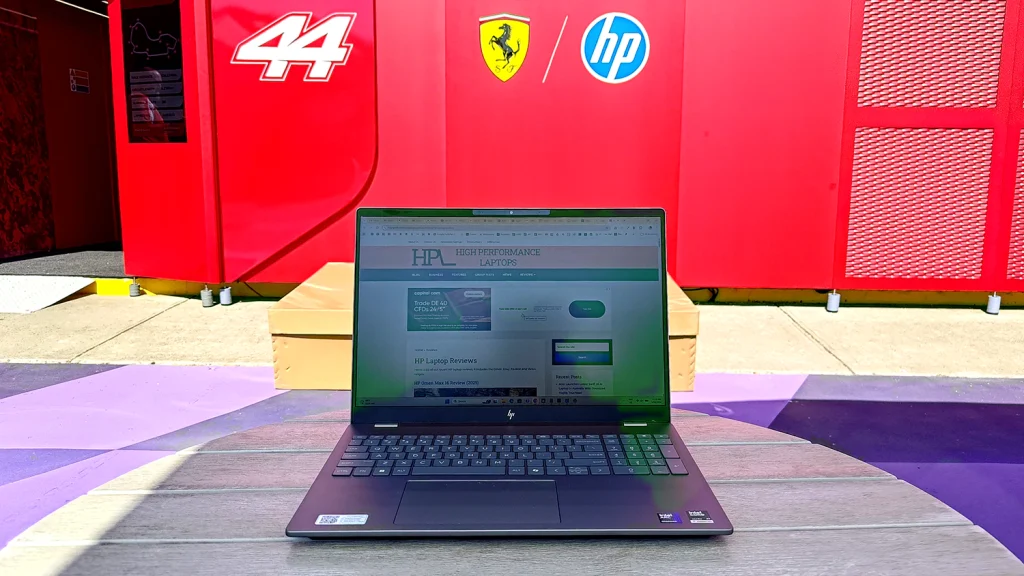
Below the screen is a full-sized Scrabble Tile keyboard. It’s on the firmer side of comfortable but not stiff enough to fatigue your fingers. A full-size number pad is present and my only gripe is the squished up-and-down arrow keys.

The trackpad is smooth, accurate. Its buttons are well weighted and not too noisy when clicked.
Above the screen is a very good 1,440p webcam that’s augmented with HP’s Poly Camera Pro software. It produces a very sharp and well-lit image, even in low light, and provides a useful set of background, lighting and retouching features in addition to useful overlays, captions, logos and framing options. It’s also Windows Hello (facial recognition login) compatible and there’s a visible hardware privacy slide.
The Poly-augmented microphones are similarly excellent at capturing clear audio, even in noisy environments.
The speakers deliver well-rounded fidelity and just-about punchy audio – there’s good bass but they aren’t the loudest I’ve heard.
All in all, the HP OmniBook 7 is a very good laptop to interact with for both work and multimedia.
Ports & Connectivity


Inside, there’s Wi-Fi 7 and Bluetooth 6 – so all the bases are covered. My only gripe here is that the charging cable (which uses the Thunderbolt ports) sticks out right where many people would be using an external mouse.
Performance
A Quick Introduction To Panther Lake
The HP OmniBook 7 is our first Panther Lake – Intel Core Ultra Series 3 – laptop. The new processor offers some significant benefits over Lunar Lake, across the board. We won’t deep-dive into them here but for the moment highlights include:
• A new (made by Intel not TSMC) manufacturing process that boosts both performance and efficiency. There are more cores, they are more performant and they can idle at lower power than even (very-low-power) Raspberry Pi systems.
• Memory is no longer baked into the processor which allows for more options for memory quantities and pricing.
• The new, third-gen Intel Xe graphics cores in the GPU are more powerful, there are more of them and they include deliver superior ray-tracing performance
I expected great things.
General Computing & CPU Tests
Inside the HP OmniBook 7 is an Intel Ultra X7 358H (Panther Lake) processor with four Performance cores, 8 Efficient Cores and four Low Power Efficient cores that operate between 1.5 and 4.8 GHz. As with Lunar Lake, there’s no Hyperthreading. It’s also got an Intel Arc B390 12-core GPU that runs at 2.5GHz and its (upgraded) NPU supports 50 TOPS. It’s flanked by 32GB of DDR5-8533 RAM and a 1TB hard drive.
Our initial performance testing focuses on the processor and the system in general. As this is the first of a new generation of CPUs, we’ll compare it with a laptop using the previous-generation, Lunar Lake technology, the Lenovo Yoga Slim 7i Aura Edition (our Laptop of the Year for 2025). This has an Intel Core Ultra 7 258H processor.
You can read our updated-for-2026 ‘How we test Laptops’ methodology, here. Also note that, in addition to raw scores we provide a 5-star rating where 1 is the weakest score we’ve seen and 5 is the strongest.
| Benchmark | OmniBook 7 Score | OmniBook 7 Star Rating | Yoga Slim 7i Score | Yoga Slim 7i Star Rating |
|---|---|---|---|---|
| GeekBench 6 (Single CPU core) | 2,904 | 3.1 / 5 | 2,738 | 2.7 / 5 |
| GeekBench 6 (Mutli CPU core) | 16,687 | 3.5 / 5 | 11,063 | 1.7 / 5 |
| UL Procyon Office Productivity (Microsoft Office) | 6,759 | 2.5 / 5 | 7,200 | 3 / 5 |
| UL Procyon Office Productivity Multi-platform (Microsoft Office) | 282,000 | 3.5 / 5 | 264,000 | 3 / 5 |
| Cinebench R24 (CPU Rendering) | 1,176 | 2.6 / 5 | 644 | 1.3 / 5 |
| UL Procyon Ai Vision (Windows, CPU, Float32) | 148 | 3.6 / 5 | 96 | 2.5 / 5 |
The OmniBook 7’s scores illustrate a significant bump in performance across the board compared to Lunar Lake for CPU-focused tasks, AI processing and general computing performance. The main, Procyon Office score is an anomaly because the benchmark changed due to feature deprecation in the time between testing these laptops – as such, it doesn’t factor into the overall score.
All in all, the OmniBook 7 has achieved one of the very best scores we’ve seen from a mid-range, non-gaming or non-Creator laptop that doesn’t have discreet graphics.
General Computing & CPU Score: 3.3 / 5
Graphics & Gaming Performance
To establish the OmiBook 7’s gaming potency, I started by running the 3DMark gaming tests. The results were as follows…
| 3DMark Benchmark | OmniBook 7 Score | OmniBook 7 Star Rating | Yoga Slim 7i Score | Yoga Slim 7i Star Rating |
| Speed Way (1,440p | Ray-tracing) | 993 (10fps) | 1.6 / 5 | 479 (5fps) | 1.2 / 5 |
| Port Royal (1,440p | Ray-tracing) | 4,186 (19fps) | 1.8 / 5 | 2,141 (10fps) | 1.2 / 5 |
| Steel Nomad (4K) | 1,618 (16fps) | 1.9 / 5 | 813 (8fps) | 1.4 / 5 |
| Steel Nomad Light (1,440p) | 6,189 (46fps) | 1.8 / 5 | 3,270 (24.2fps) | 1.3 / 5 |
| Solar Bay (1,440p | Ray-tracing) | 30,064 (114fps) | 1.8 / 5 | 16,538 (63fps) | 1.4 / 5 |
| Wild Life Extreme (4K) | 12,803 (77fps) | 1.9 / 5 | 7,287 (44fps) | 1.4 / 5 |
| Night Raid (Full HD) | 49,559 (373fps) | 2.9 / 5 | 34,534 (213fps) | 2.1 / 5 |
I keep having to remind myself that these scores are from a laptop with an integrated Intel GPU – they’re rivalling laptops with discreet Nvidia 4050 GPUs in some cases. While it can’t run the most eye candy rich games with full ray tracing, it’s given them a good go and there are few things it won’t play with a drop in settings and resolution: that’s extraordinary. It might not be a gaming laptop, but it’s fair to say that the OmniBook 7 is a laptop that can play games.
One of my favourite GPU tests is the UL Procyon Video Editing benchmark which uses Adobe Premiere to encode four different (900MB) UHD video files. It scored 15,640 (Score: 1.8 / 5). For real-world context, this means the most difficult encoding workload (UHD, H.265, 60fps) took 155 seconds. That’s half the time many other premium, non-gaming laptops take. Very impressive.
Finally, I ran the GPU version of the UL Procyon Computer Vision benchmark and it scored 390 (2.3 / 5). That’s much higher than previous generations of integrated Intel GPUs, but I couldn’t tell you what the benefit was beyond there being a boost to general processing efficiency with some tasks.
Cooling
The HP OmniBook 7 generally runs cool and quiet. The fan can ramp up to a sustained, light whoosh when under sustained load, but it never gets particularly warm. I also ran the 30-minute version of the Cinebench benchmark and the score dropped by just 1.5 per cent, so there’s no significant thermal throttling at play.
Graphics & Gaming Performance Score: 2.1 / 5
Portability & Battery Life
At 1.96KG, the OmniBook 7 is not particularly light, even for a 16-inch laptop. Fortunately, it comes with a phone-style charger that adds only 245g to the mix (and which can fast charge the laptop to 50 per cent in 30 minutes). You won’t need it much, though, as the OmniBook 7 ran our UL Procyon Office Battery Benchmark for an impressive 22 hours and 20 minutes. I think we’ll see more from Panther Lake laptops in the future as the OmniBook’s screen was still rather bright when set to its lowest setting and this can severely sap battery life.
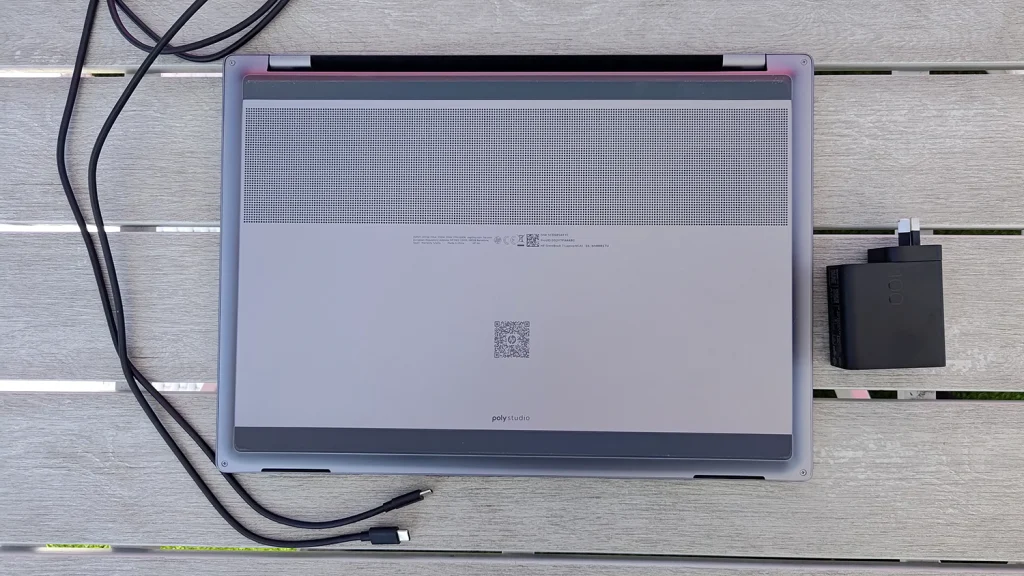
As for build quality, the OmniBook 7 feels very sturdy and robust. There’s no creak in the chassis and only a slight flex occurs when a twisting force is applied to the thin, aluminium lid. It should happily survive being carted around from place to place.
Portability & Battery Life Score: 3.4 / 5
Price, Value & Availability
We’ll be adding some international pricing to our laptop reviews from now on as many international readers struggle to visualise what an Aussie dollar is worth compared to more recognisable global currencies.
In Australia, Our SKU (16-bh0001TU) of the HP OmniBook 7 costs $3,499. That’s not cheap but, this is new technology and it’s still good value. It’s also MUCH cheaper than dedicated gaming laptops which have ballooned in price in the past year.
In the US, Newegg lists a 2TB version of the same laptop at US$1,879 when we went to press.
We couldn’t find it on sale in the UK or India, but we’ll update this when we can.
Value Score: 3.5 / 5
Conclusion: Should You Buy The Panther Lake HP OmniBook 7?
If you’re in the market for a do-everything, 16-inch laptop, then it’s one of the very best we’ve seen, that’s not an overt gaming laptop. However, it’s also the first Panther Lake laptop we’ve seen and a bunch more are heading our way, so time will tell where it sits in the modern market.
Still, beyond its bulk, it doesn’t have any weakpoints and, unless you’re a highly demanding gamer that absolutely needs the best graphics performance, this will suit most users so, we’re happy to recommend it.
Overall Score: 4.1 / 5
Awards

Last Updated on 6 April 2026 by Nick Ross