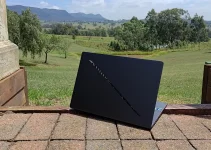
MSI’s Vector series is its premium gaming line that eschews eye-melting RGB bling and ostentatious decorations for an office-friendly chassis that can suit all occasions. We’ve been greatly impressed by previous versions, but now, here’s the latest and greatest 16-incher, the MSI Vector 16 HX A14V. Can it be the powerful gaming laptop that you’ve been looking for?
MSI Vector 16 HX A14V Specs
| Screen | 16-inch, matte, 240Hz, 2,560 x 1,600, IPS display |
| Processor | 1.5-5.8GHz Intel Core i9-14900HX CPU |
| Memory | 32GB DDR5-5600 RAM |
| Graphics | 12GB Nvidia GeForce RTX 4080 |
| Hard drive | 2TB |
| Connectivity | Wi-Fi 6E Bluetooth 5.2 1 x Thunderbolt 4 2 x USB-C 3.2 Gen 2 1 x USB-A 3.2 Gen 2 1 x USB-A 3.2 Gen 1 1 x HDMI 2.1 1 x SDcard reader 1 x 2.5Gbps Ethernet 1 x 3.5mm audio jack 2 x Thunderbolt 4 |
| Speakers | 2 x 2-Watt |
| Extra Security | Windows Hello (webcam) |
| Webcam | 720p |
| Battery | 90Wh |
| Dimensions | 357 x 284 x 29mm |
| Weight | 2.66KG |
| SKU | A14VHG-431AU |
Features, Ergonomics and Design
MSI’s Vector 16 HX A14V comes in the familiar, dark, MSI gunmetal colour called Cosmos Grey. The lid has a glossy dragon logo on it but it’s discreet enough to fit in an office when required. It feels very solidly built and high quality. When alight, the per-key RGB-lit Steelseries keyboard reminds you that the Vector is very much a gaming laptop, but again, toning down the lights set it back to office mode. Only the translucent WASD keys give the game away. Ultimately, it’s very smart and understated.

The 16-inch IPS screen has a high, 2,560 x 1,600 resolution, gets very bright and displays vibrant colours. The Windows Desktop is crisp and clear and multimedia looks colourful and engaging. Contrast and true black performance can’t match OLED and miniLED displays – blacks can be a little washed out and details can disappear in the brightest areas. However, no enemies will be able to hide in the shadows.

There’s light stepping in colourful gradients and monochromatic equivalents can get a bit messy owing to excessive artefacts. We’ve seen worse but we’ve also seen better from rivals – especially those with screens that support HDR, which smooths all gradients out.
That all said, the Vector 16’s screen has still got it where it counts. Games and movies look great on the bright and colourful display and the matte finish banishes the distracting reflections that blight OLED displays. Plus, the 240Hz refresh rate combines with a quick pixel response time to keep fast-moving objects rendered sharp and clear with no ghosting. You’d have to be an extremely demanding, pro-level FPS player to want more speed. The Vector also supports 100 per cent of the tricky DCI-P3 colour space, which designers will like.
Above the screen is an HD webcam (with privacy slide). It’s not the highest resolution in the current market and images can look a little soft accordingly. It can get a bit grainy in low light, too. Still, it captures clean audio, even in noisy environments. Note that there’s no Windows Hello facial-recognition log-in capability (there’s no fingerprint reader either).
There are twin, two-Watt speakers which get loud and punchy. Fidelity is generally very good, but the lack of woofers mean audio isn’t quite as well-rounded as some rivals. I’m nit-picking, though.
The A14V’s Steelseries keyboard is, as ever, impressively comfortable and accurate to type upon for extended periods. There the arrow keys and number pad are reduced in size, but they’re not squished and still very usable. We like all of the shortcut keys and the RGB configurable lighting looks fab.

The trackpad is smooth, accurate and has well-weighted button actuation.
It’s worth mentioning MSI’s useful Ai Artist app which can create Ai-generated images without being online or compromising your IP by sending it to a third-party service.
Related: Best Business Laptops for Work & School
Related: Best Gaming Laptops
Related: Best Portable Laptop
Connectivity and Ports


Inside, there’s Wi-Fi 7 and Bluetooth 5.4 wireless connectivity. Basically, it’s got the latest and greatest everything in this area.
At the end of the day, the Vector 16 HX A14V is very good to interact with and few people will feel limited by its few, minor imperfections.
Features, Ergonomics and Design Score: 3.6 / 5
Performance
Inside MSI’s Vector 16 is a 14th Gen Intel (Raptor Lake) Core i9-14900HX processor whose eight Performance cores and 16 Efficient cores operate between 1.5 to 5.8GHz across 32 threads. There’s no NPU, but the Raptor Lake architecture still provides more power (and consumes more power) than even Intel’s newer CPUs.
It’s joined by 32GB of quick, DDR5-5600 RAM, a capacious 2TB NVMe hard drive and a high-end, Nvidia GeForce RTX 4080 GPU.
The CPU and the GPU embrace MSI’s OverBoost Ultra technology which ensures that the former has full access to 65-Watts of power and the latter, 175-Watts of power, simultaneously, when required. That’s some way up from the recent HP Omen Transcend 14 gaming laptop which was hamstrung by its 140-Watt power supply.
In the general computing, PCMark 10 benchmark, which tests all elements of the system running at the same time, the Vector 16 HX scored a very impressive 9,034 which is among the highest scores we’ve seen. (Score: 4.6 / 5)
In the Cinebench processor-based rendering tests, the Vector scored 4,723 in the rapid R15 test and 28,344 in the longer R23 test. These are both very impressive results (Score: 4.3 / 5)
In the 3DMark gaming tests, the Vector 16 started-off by scoring 4,914 (average 49.1fps) and 12,344 (average 57.2fps) in the tricky, ray-tracing, Speed Way and Port Royal tests, respectively. This illustrates that it will (for the most part) have little trouble playing the latest and greatest games at the best settings. You may have to drop the resolution and settings on some of the most demanding titles to keep them running smoothly, though.
In the 3DMark Time Spy and Fire Strike Extreme benchmarks, which mimic AAA-gaming titles, the Vector 16 scored 19,017 (average 120.7fps) and 22,117 (average 104.9fps) respectively. Consequently, the Vector will have few issues playing mainstream games.
In the easier, 3DM ark Night Raid test, which apes casual and competitive games, the Vector 16 scored 83,937 (average 884.3fps), so no issues there. Such games will easily stay smooth on the fast screen.
3D Performance Score: 4.5 / 5
We’ll be updating our benchmarks in 2025 so, for now, the following scores are presented for reference:
UL Procyon Microsoft Office: 8,074
UL Procyon Adobe Photo Editing: 8,446
UL Procyon Adobe Premiere: 38,840
UL Procyon Ai Vision (CPU): 49
UL Procyon Ai Vision (CPU): 812
3DMark Solar Bay: 92,286
3DMark Steel Nomad: 4,308
Cooling
The Vector 16 HX’s cooling prowess comes via MSI’s Cooler Boost 5 technology which has two fans and six heat pipes. It’s worth noting that it’s not the quietest. In silent mode it produces a very mild whoosh but, under load this can ramp up to a more-noticeable sound. When forced to maximum, it produces a constant, robust whoosh but, it’s worth noting that we’ve hear much louder. Fortunately, the Vector rarely gets more-than warm.
In our thermal throttling test, the Vector 16 ran the 30-minute version of the Cinebench R23 benchmark with only a one per cent drop in performance, so we’ve no concerns about thermal throttling. Ultimately, the Vector’s cooling tech is very efficient, if not the quietest.
Portability and Battery Life
The 16-inch Vector 16 HX tips the scales at 2.66KG which isn’t light, but that’s acceptable for a stacked, 16-inch gaming laptop. The 330-Watt power supply and cables add a not-inconsiderable 990g to the mix, which also isn’t light but we’ve also seen much heavier and much larger bricks from both rivals and MSI predecessors.

You’ll need to carry the latter around as the 90Wh battery ran our PCMark 10 Modern Office Battery Test for 6 hours and 35 minutes (and the UL Procyon Microsoft Office benchmark for 7 hours and 6 minutes) which isn’t great but not surprising considering the internals need constant cooling.
Still, it’s well built and has solid hinges and I expect it to survive a life being lugged between LANs and offices without issues.
Portability and Battery Life Score: 1.8 / 5
Price, Availability and Value
The MSI Vector 16 HX A14V costs $4,799 which is not cheap but it’s good value considering the performance and features on offer. The good news is that, if you’re quick, you can pick it up for just $3,399 which makes it very good value.
Lesser versions, with Nvidia 4070 GPUs are available for $4,399. I’ve found these down to $3,299 in the current sales.
Alternatives include the HP Omen Transcend 16 and the Asus ROG Zephyrus G16 which can both cost less if you find them in the right sale.
Value: 3.5 / 5 (On Sale: 4.3 / 5)
Conclusion
MSI says the Vector 16 HX A14V is targeted at STEM professionals who like to game in their spare time. Personally, I think it will suit anyone who wants a powerful gaming laptop that will suit any office work environment. If you can get it on sale, it’s a great buy.
Overall: 4.3 / 5 (On Sale: 4.9 / 5)

Last Updated on 26 April 2025 by Nick Ross